
View addresses used for transaction change return
Complete Step-by-Step Process with All Screenshots
Navigation Path: Home → Seeds → [Select Seed] → Address Explorer


Process Flow:
- Script Type Selection → Choose your preferred address format

- Change Access → Select “Change Address” instead of receive
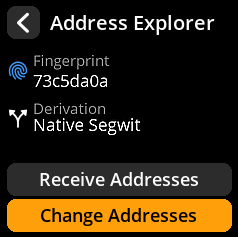
- Address Management → Browse change addresses (paginated: 10 per view)
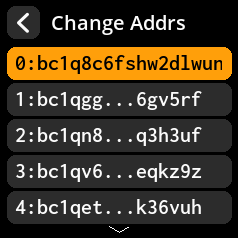
- QR Code Access → Tap any address for QR code display

Key Information
Address Types Available:
- Native Segwit (recommended)
- Nested Segwit (compatibility)
- Taproot (advanced features)
Privacy Best Practice: Use a fresh receiving address for each transaction
Technical Note: Change addresses automatically handle transaction remainder funds
💡 Best Practice: Change addresses are automatically managed by your wallet – you typically don’t need to manually generate or share them.